使用laravel搭建CURD后台页面
发布于 2014-10-31 09:39:09 | 1166 次阅读 | 评论: 0 | 来源: 网友投递
这里有新鲜出炉的Laravel 快速入门,程序狗速度看过来!
Laravel PHP Web开发框架
Laravel是一套简洁、优雅的PHP Web开发框架(PHP Web Framework)。它可以让你从面条一样杂乱的代码中解脱出来;它可以帮你构建一个完美的网络APP,而且每行代码都可以简洁、富于表达力。
本文为大家讲解的是实用php框架laravel搭建curd后台管理页面完整示例教材,感兴趣的同学参考下。
配置即一切
一切皆于需求,后台从0开始搭建,但是写了一两个页面后发现太多的是对单表的增删改查操作,于是就想到了,能不能做一个快速搭建的后台。想到一句话,配置即一切。如果一个CURD后台能只进行配置就自动生成,该是多么美妙的事情,那么就开始搭建这么个结构。
首先配置文件应该怎么设计
起初想到将配置文件放到config目录下,但是想想还是放弃了这个想法,那样子可能会导致有一个“万能”文件,又臭又长。那么,其次,这个功 能只针对单表,所以,是不是可以将配置文件放置在Model中,后来也觉得这个想法不大好,这个配置文件是承担页面展示的功能的,如果放在Model中就 算是入侵了Model层了。所以最后决定放在了Controller中。
最后的效果大概是什么样子的?
后台大概会有几个页面:
列表页:
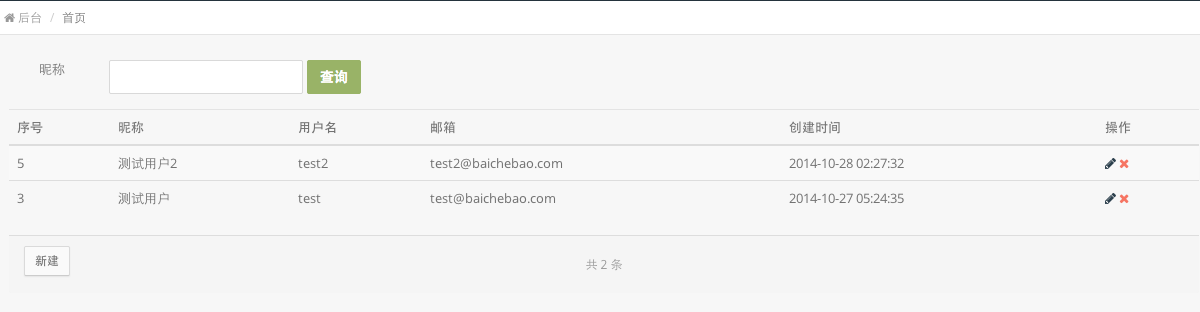
列表页中有查询操作,编辑,删除按钮,新建按钮。
新建页面:

编辑页面:

好了,对应这几个页面,我们可以设置配置项了。
基本想法是搭建一个FormController,所有以后需要配置生成后台的controller就继承这个FormController就好了。在FormController中定义属性:
class FormController extends BaseController {

     // 对应的模型
     protected $model;

     // 所有的字段
     protected $fields_all;

     // 列表页显示的字段
     protected $fields_show;

     // 编辑页面显示的字段
     protected $fields_edit;

     // 创建页面显示的字段
     protected $fields_create;
}
定义了Model,来表示这个Controller是对那个Model进行单表操作的。
定义了fields_all属性,来将所有的字段来进行一个说明和定义。这个定义和说明就包括字段显示名字,字段是否要进行搜索,字段类型是什么。
对于列表页,不是所有属性都显示出来,所以定义一个fieldsshow,这个数组存放的是fields_all中的一些字段,用来显示的字段。
对于编辑页面,要显示的字段就放在$field_edit中
对于创建页面,要显示的字段就放在$field_create中
好了,现在继承FormController的类就只需要这么配置就好;
<?php

// 账号管理系统
class BadminController extends FormController
{

     public function __construct()
     {
          $this->model = '\Badmin';
          $this->fields_all = [
               'id' => [
                    'show' => '序号',
               ],
               'nickname' => [
                    'show' => '昵称',
                    'search' => "nickname like CONCAT('%', ?, '%')"
               ],
               'username' => [
                    'show' => '用户名',
               ],
               'email' => [
                    'show' => '邮箱',
               ],
               'password' => [
                    'show' => '密码',
               ],
               'created_at' => [
                    'show' => '创建时间',
               ],
               'updated_at' => [
                    'show' => '更新时间',
               ],
          ];

          $this->fields_show = ['id' ,'nickname', 'username', 'email', 'created_at'];
          $this->fields_edit = ['nickname', 'username'];
          $this->fields_create = ['nickname', 'username', 'email', 'password'];
          parent::__construct();
     }
}
在构造函数中定义model,fieldsall,fields_show, fieldsedit,fields_create。
对于fields_all,key为数据库对应的字段名,value为一个数组,show是显示名,如果你在列表页希望这个字段能进行搜索,就设置下search属性。
路由
下面是路由,laravel中路由基本有三种:
Route::get('order/{id}',['as'=>'order.detail','uses'=>'OrderController@show']);
Route::controller('preview', 'PreviewController');
Route::resource('badmin', 'BadminController');
第三种已经完全定义好了增删改查操作,看起来能省我不少的事情,好吧,我就使用这个resource来做了。
所以在route.php中我只需要定义这么一条就ok了
// 管理员账号管理
Route::resource('badmin', 'BadminController');
Controller
下面写FromController中的resource方法
按照laravel的resource定义的,需要填充的方法有:

我习惯在构造函数中把一些诸如Input,全局定义的东西都share到模版中,代码如下:
     public function __construct()
     {

          // TODO:做一些基础的判断,如果没有的话就抛出异常

          $route = Route::currentRouteAction();
          list($this->controller, $action) = explode('@', $route);
          View::share('controller', $this->controller);

          $fields_show = array();
          foreach ($this->fields_show as $field) {
               $fields_show[$field] = $this->fields_all[$field];
          }
          View::share('fields_show', $fields_show);

          $fields_edit = array();
          foreach ($this->fields_edit as $field) {
               $fields_edit[$field] = $this->fields_all[$field];
          }
          View::share('fields_edit', $fields_edit);

          $fields_create = array();
          foreach ($this->fields_create as $field) {
               $fields_create[$field] = $this->fields_all[$field];
          }
          View::share('fields_create', $fields_create);

          View::share('input', Input::all());
     }
这里把controller放到外面是为了在view中可以使用诸如:
action(controller.′@destroy′,model->id),
的路径定义
index函数:
     public function index()
     {
          $model = new $this->model;
          $builder = $model->orderBy('id', 'desc');

          $input = Input::all();
          foreach ($input as $field => $value) {
               if (empty($value)) {
                    continue;
               }
               if (!isset($this->fields_all[$field])) {
                    continue;
               }
               $search = $this->fields_all[$field];
               $builder->whereRaw($search['search'], [$value]);
          }
          $models = $builder->paginate(20);

          return View::make('form.index', [
               'models' => $models,
          ]);
     }
$builder在laravel中真是太TMD好用了,对于这里的搜索,我使用whereRaw进行prepare查询。这里还有一个点,之前在 fields_all设计的时候,我定义的直接是一个 'search' => "nickname like CONCAT('%', ?, '%')" 这里定义搜索字段的时候其实有很多种设计方法,比如定义为
‘search’ => [
     'type' => 'like',
     'value' => '%?%'
]
但是考虑到使用这个FromController的都是程序员,所以这里的search直接使用预处理的语句,然后在index中直接使用whereRaw,这样使得配置文件的易读性增加了。
下面是
create函数:
     public function create()
     {
          return View::make('form.create', []);
     }
store函数:
     public function store()
     {
          $model = new $this->model;
          $model->fill(Input::all());
          $model->save();
          return Redirect::to(action($this->controller . '@index'));
     }
这里的model的fill是不是很简单,爽到爆。当然model中还是需要定义fillable字段
edit,update,destory函数
如法炮制就好
     public function edit($id)
     {
          $model = new $this->model;
          $model = $model->find($id);
          return View::make('form.edit', compact('model'));
     }

     public function update($id)
     {
          $model = new $this->model;
          $model = $model->find($id);
          $model->fill(Input::all());
          $model->save();

          return Redirect::to(action($this->controller . '@index'));
     }

     public function destroy($id)
     {
          $model = new $this->model;
          $model->destroy($id);

          return Redirect::to(action($this->controller . '@index'));
     }
View
下面就是view的编写。
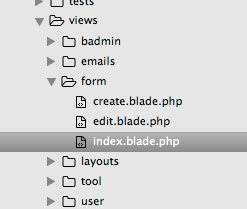
view大概就只要三个页面,列表页面,编辑页面,创建页面
列表页面注意事项:
1 使用laravel自带分页,注意记得带上本页的输入参数,这个时候,构造函数中share的Input就很有用了
{{models−>appends(input)->links()}}
2 可以使用laravel自带的from操作,比如删除操作由于需要调用HTTP的DELETE 方法,可以这么写
                 {{ Form::open(array(
                  'id' => "delete_{$model->id}",
                  'url' => action($controller . '@destroy', $model->id),
                  'class' => 'dropdown-toggle')) }}
                    {{ Form::hidden('_method', 'DELETE') }}
                  {{ Form::close() }}
其实自己写DELETE也行,就是在From表单中多传递一个_method隐藏域
3 搜索直接使用一个form就可以搞定了
     <form class="form-inline" role="form" action="{{action($controller . '@index')}}">
          @foreach ($fields_show as $field => $field_info)
            @if (isset($field_info['search']))
            <div class="form-group">
              <label class="col-sm-3 control-label">{{$field_info['show']}}</label>
              <div class="col-md-3">
                <input name="{{$field}}" type="input" class="form-control" placeholder="" value="@if (isset($input[$field])){{$input[$field]}}@endif">
              </div>
            </div>
            @endif
          @endforeach
          <input type="submit" class="btn btn-success" value="查询" />
        </form>
编辑页面和创建页面
简单到只需要一个form就能搞定了
  <form class="form-horizontal"
          role="form"
          action="{{action($controller . "@update", $model->id)}}" method='POST'>
          <input type="hidden" name="_method" value="PUT">
            @foreach ($fields_edit as $field => $field_info)
            <div class="form-group">
              <label class="col-sm-2 control-label">{{$field_info['show']}}</label>
              <div class="col-sm-10">
                <input name="{{$field}}" type="text" class="form-control" placeholder="" value="{{$model->$field}}">
              </div>
            </div>
            <div class="line line-dashed line-lg pull-in"></div>
            @endforeach
            <div class="col-sm-4 col-sm-offset-2">
              <button type="submit" class="btn btn-primary">提交</button>
            </div>
          </form>
记得resource中更新的操作是要使用PUT方式,删除的操作要使用DELETE方式。
至于view的模版,我这里使用的是一款叫notebook的模版,它是基于bootstrap的,你也可以使用其他更好看的模版来写。
好了,至此这么个快速搭建CURD的结构就完成了。现在可以在运营人员给需求的时候,很牛逼地说,等我一分钟,我就给你一个世界~~
后记
其实回想下,这整个结构不算复杂。配置即一切的思想能解决很多问题。但是依赖配置的路子最怕的是几个事情:
1 配置文件过于复杂。(如果你的配置文件过于复杂,已经超过了敲代码本身需要了解的东西,那么这个配置项的学习成本就太太太高了)
2 配置字段语意不清。(配置的字段名字和意思不对,字段名和变量名一样重要!)
当然这个就是个初步,改进的几个点还有
1 所有字段都使用input标签,需要在配置中加入其它标签类型
2 是不是考虑view中所有的东西都使用laravel自带的form对应字段?
推荐阅读
最新资讯